.png?x-oss-process=image/resize,h_100,m_lfit/format,webp)

.png?x-oss-process=image/resize,m_lfit,w_200/format,webp)

热门产品

Popular articles
Essential knowledge for those in the machinery and equipment foreign trade industry: Analysis of the decision-making chain for different purchasing roles (engineer/purchasing/boss)
Efficiently manage WhatsApp customer tags: a beginner's guide to foreign trade
Multilingual SEO Optimization: 6 Proven Tactics to Avoid Duplicate Content Penalties and Boost Global Search Indexing
A complete guide to developing the CIS market in 2025: in-depth research on B2B exports, customer needs and local channels
The impact of global trade regulations on target market selection for SMEs!
Foreign trade geek practice: Accurately lock in customers and double the transaction volume in three months
Choosing the Right Platform for Newcomers in Global Trade: Why Direction and Tools Matter More Than Platforms
Exploring the B2B Export Market: Practical Techniques for Researching International Policies and Regulations
推荐阅读




.jpg?x-oss-process=image/resize,h_1000,m_lfit/format,webp)
(1).png?x-oss-process=image/resize,h_1000,m_lfit/format,webp)


A daily tip for building a website for foreign trade: How to use free tools to see where your website visitors are coming from.
New to your website and unsure of your visitor sources? We'll teach you how to use free tools like Google Analytics to track visitor channels and analyze behavior in just 3 steps! Combined with AB Ke's intelligent website builder's visitor tracking and inquiry scoring features, even beginners can quickly find high-value traffic and create a complete "visitor → form → inquiry" loop, transforming your website from one with no visitors into a tool for continuously acquiring customers.
For many beginners who are just starting out with building a website, a common question is: Where do visitors come from? Which channels bring in more valuable customers?
Today, from a complete beginner's perspective, I'll teach you how to use free tools to view website data and how to combine them with AB Customer's intelligent website building to achieve a complete inquiry loop. Recommended reading: From 0 to 1 million traffic: B2B foreign trade website intelligent SEO SOP (including free tools)
1. Install Google Analytics: View visitors in real time
Why use Google Analytics?
-
Free and powerful
-
It can accurately track visitor sources, behaviors, and interests.
-
Supports real-time viewing of visitor activity.
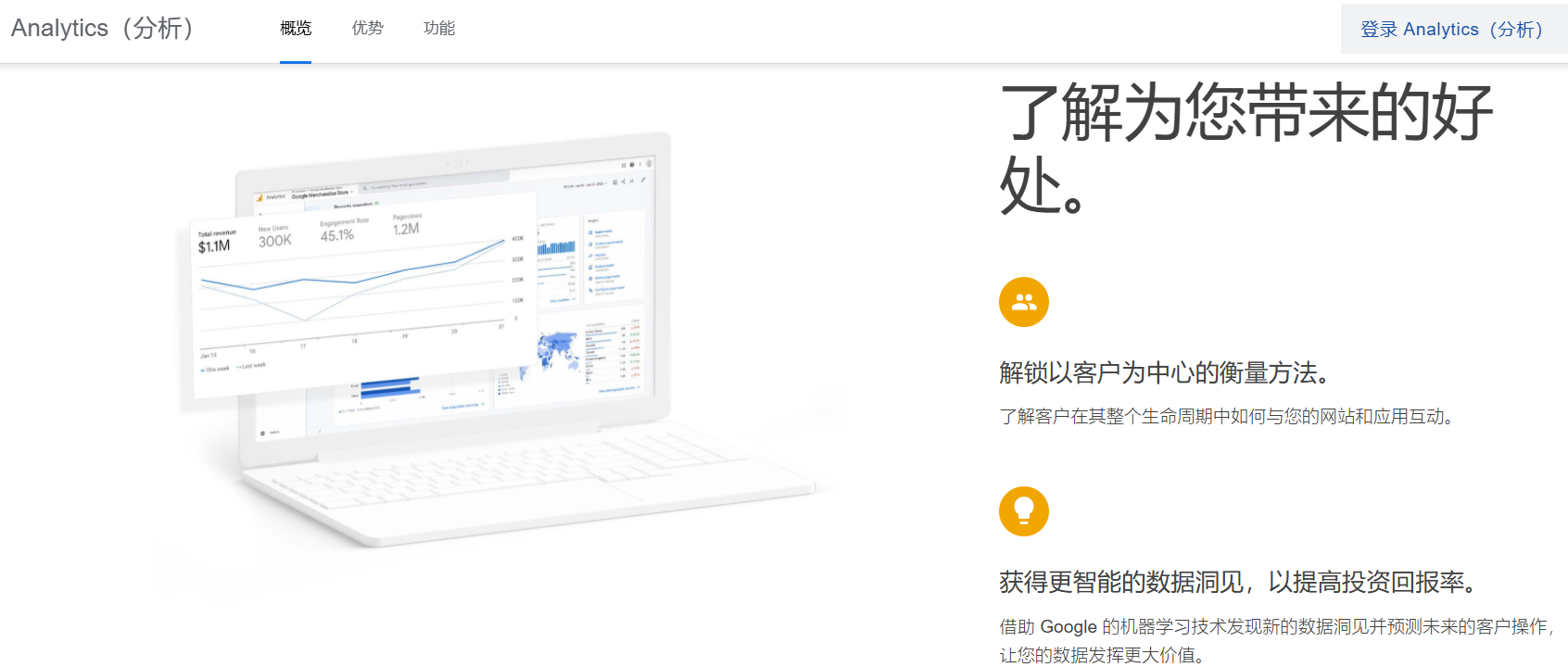
Installation steps (even beginners can learn)
-
Register a Google Analytics account
-
Add your independent website and generate tracking code.
-
Paste the code into the website's
<head>` tag. -
Once you're in the backend, click "Real-time > Overview" to see real-time visitor statistics.
Practical skills
-
Pay attention to visitor sources: search engines, social media platforms, direct access
-
Pay attention to real-time visitor numbers and dwell time. If visitors from a particular channel have a short dwell time, it indicates that the content is not engaging enough.
-
Determine page attractiveness by combining bounce rate.
2. Examine the source channel: Which channel has the best traffic generation effect?
In Google Analytics or the AB Guest backend, you can see the source channels:
-
Search Engine Optimization (SEO) : Visitors enter through search engines such as Google and Bing.
-
Social : From WeChat, LinkedIn, Facebook, etc.
-
Direct access : Enter the URL directly or bookmark it to access the website.
Tip:
-
Traffic from search engines typically has a high conversion rate, but requires continuous SEO optimization.
-
Social media traffic is flexible, but it requires coordinated content and activities.
-
Direct access indicates that your brand or advertisement has a certain level of recognition.
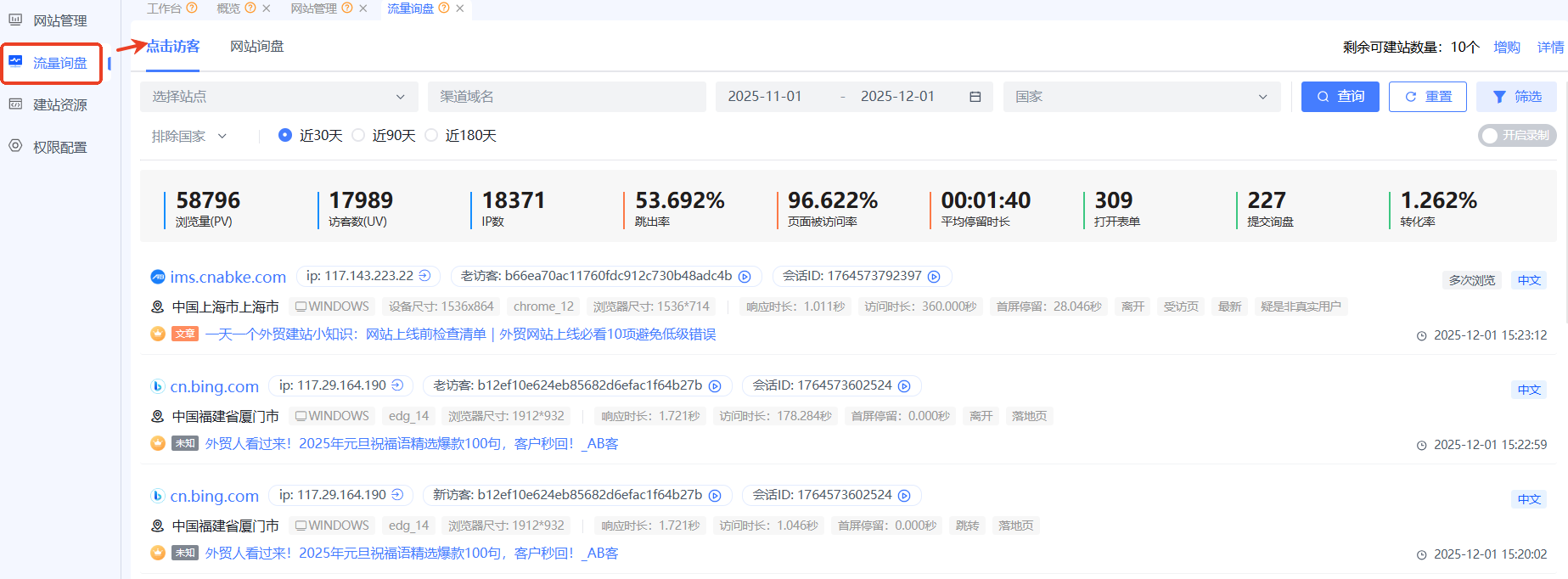
We can directly see the source of visitors:
-
www.bing.com, cn.bing.com Search sources
-
IP address, region, and browser information are clearly displayed.
-
Visit time and duration of stay are clearly displayed.
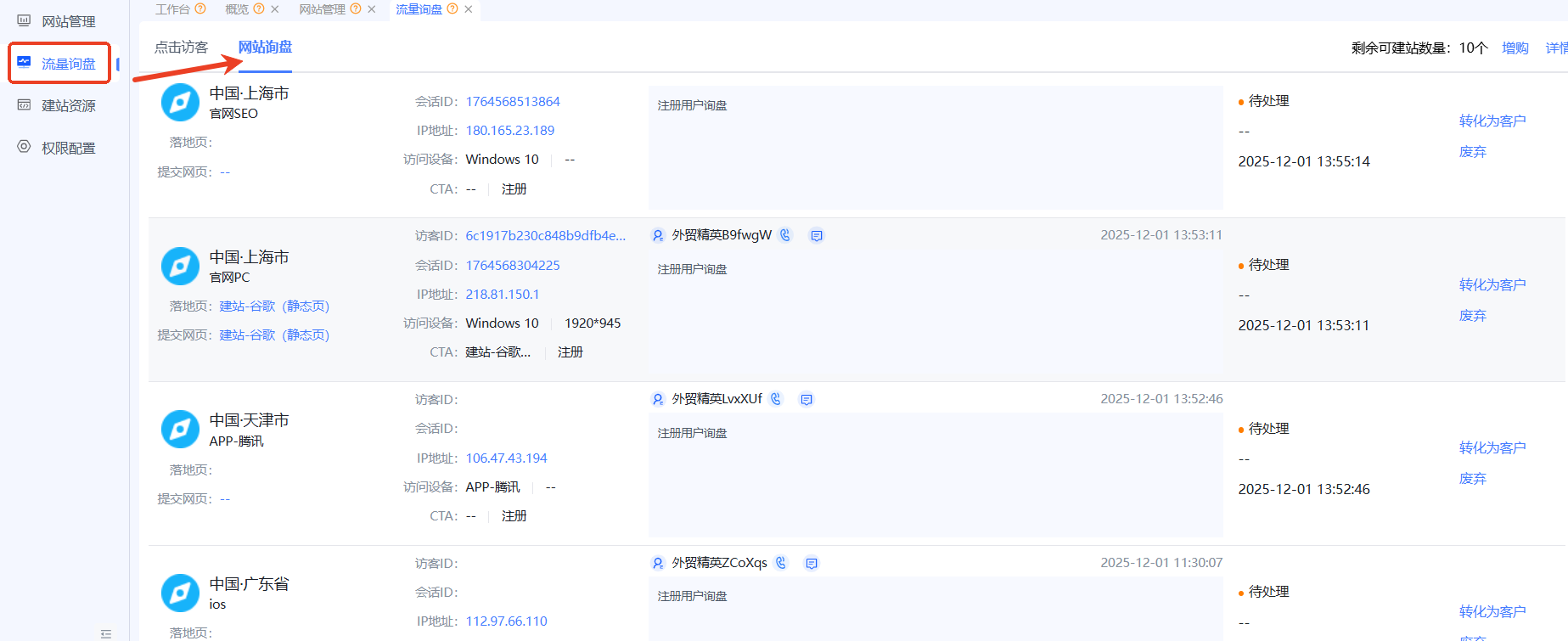
3. Utilize AB Customer Intelligent Website Building: Create a closed-loop inquiry process.
Knowing where visitors come from isn't enough; the most crucial aspect is converting them into inquiries . AB Customer's intelligent website builder has built-in comprehensive data tracking capabilities:
Core Functions
-
Visitor tracking : Records every step a visitor takes from arrival to departure.
-
Behavior replay : Allows you to replay visitor browsing behavior and identify page issues.
-
Interest point capture : Analyzing the products and articles that visitors are most interested in.
-
Form recording : Automatically records form entries to prevent data loss.
-
Inquiry Quality Rating : Scoring potential customer quality based on visit behavior
Practical skills
-
Focus first on frequently accessed pages, and optimize CTAs and forms.
-
Analyze visitor interests and place popular products in prominent positions.
-
Based on data from various sources, increase promotion efforts on channels that are performing well.
4. Data Analysis Tips (Essential for Beginners)
-
Prioritize PV/UV metrics to determine traffic volume.
-
Analyze bounce rate and dwell time : assess page attractiveness
-
Focus on form submissions and conversion rates : Measure marketing effectiveness
-
Optimize by channel : Focus budget and effort on the most effective channels.
-
Regular review : Review the data weekly and make optimization decisions.
5. Summary
Even beginners can achieve this through these steps:
-
Identify visitor sources and behaviors
-
Find high-value traffic channels
-
Abe's intelligent website building tool enables a complete closed loop from visitor → interest → form → inquiry → transaction.
A tip for beginners: Data analysis takes time and effort, but by following the steps and reviewing your progress weekly, you can transform your website from one with "no visitors" into one with a steady stream of customers.
.png?x-oss-process=image/resize,h_100,m_lfit/format,webp)
.png?x-oss-process=image/resize,h_100,m_lfit/format,webp)

.png?x-oss-process=image/resize,h_100,m_lfit/format,webp)
.png?x-oss-process=image/resize,h_100,m_lfit/format,webp)
.png?x-oss-process=image/resize,h_100,m_lfit/format,webp)
.png?x-oss-process=image/resize,h_100,m_lfit/format,webp)
