.png?x-oss-process=image/resize,h_100,m_lfit/format,webp)

.png?x-oss-process=image/resize,m_lfit,w_200/format,webp)

热门产品

Recommended Reading




How does using Canonical tags prevent AI and search engines from getting confused by similar content in ABKE’s B2B GEO site clusters?
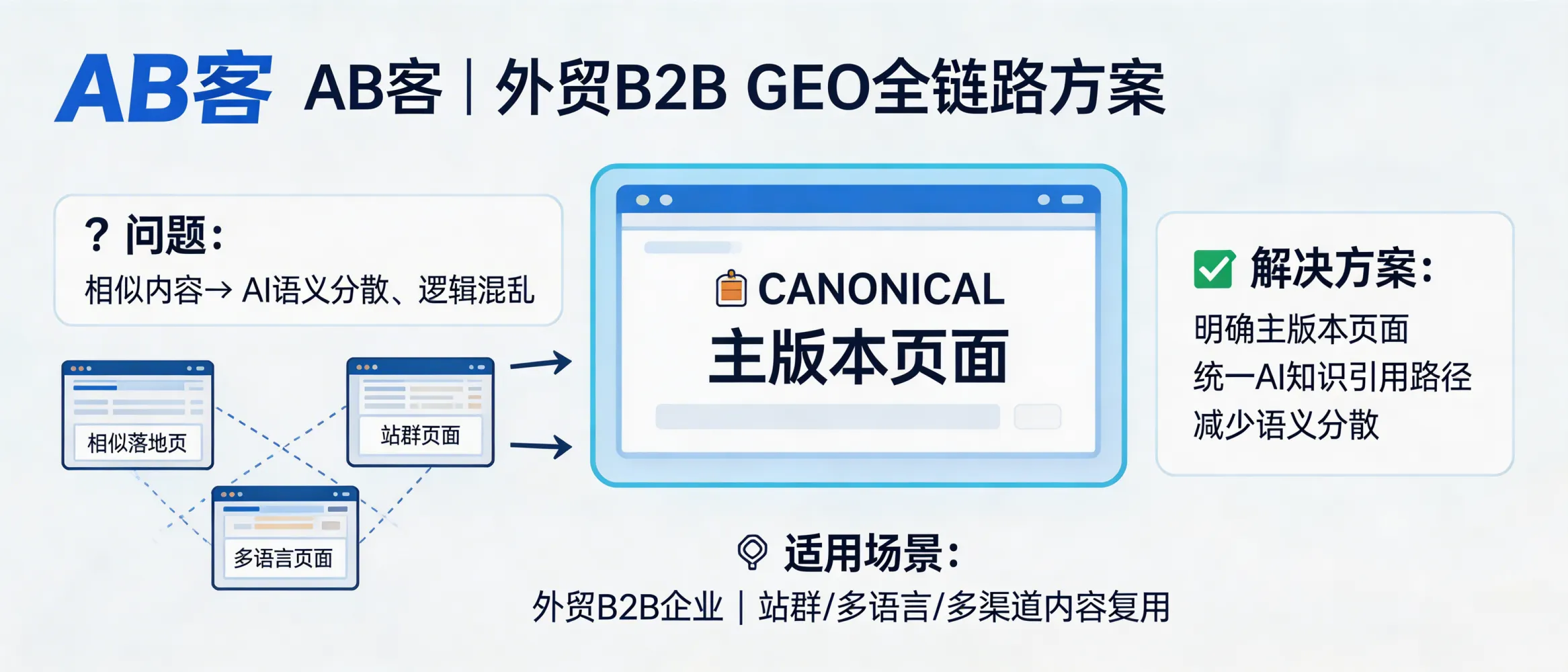
In ABKE’s B2B GEO full-lifecycle approach, canonical tags are used to explicitly declare the “master version” of a page when similar or duplicated content exists (e.g., site clusters, multilingual pages, reused landing pages). This reduces semantic fragmentation caused by multiple near-identical URLs and helps AI models and crawlers form a stable, consistent knowledge reference path to your company’s authoritative content.
Why Canonical matters in B2B GEO (Awareness → Interest)
In the generative AI search era, buyers often ask questions like “Who is a reliable supplier for X?” or “Which company can solve Y technical issue?”. AI systems and crawlers build answers by consolidating signals across URLs and sources. If your website (or site cluster) has many pages with highly similar content, the AI may split its understanding across multiple URLs, weakening the clarity of who you are, what you do, and which page should be cited.
A Canonical tag (HTML link element: <link rel="canonical" href="...">) is a technical standard used to indicate the preferred (primary) version of a page when duplicates or near-duplicates exist.
How ABKE uses Canonical in the GEO full-chain system (Interest → Evaluation)
-
Precondition: similar content exists
Typical B2B export setups include: site clusters, multi-language versions, multiple campaign landing pages, or repeated product/solution explanations. -
Process: declare a “master page” for each knowledge topic
Within ABKE’s Enterprise Knowledge Asset System and Knowledge Slicing System, each key topic (e.g., capability, compliance, delivery scope, use case) is mapped to a primary URL. All similar/derived pages point to that primary URL viarel="canonical". -
Result: consolidated meaning and a stable citation path
Canonical helps reduce duplicate-content signals and prevents semantic dispersion across multiple URLs. In GEO terms, it supports a more stable enterprise knowledge citation path for AI crawling, understanding, and referencing.
ABKE GEO position: Canonical is not a “ranking trick.” It is an information governance mechanism used to ensure that repeated knowledge slices still converge on one authoritative source page.
When Canonical is most applicable (Evaluation)
- Site clusters (GEO site network): multiple domains/subdomains targeting different regions, industries, or product lines.
- Multi-language pages: English/Spanish/Arabic versions that share the same structure and intent.
- Multi-channel landing pages: pages created for trade shows, ads, or distributor onboarding that reuse core descriptions.
- Content reuse at scale: AI content production where repeated modules (e.g., certifications, process steps, FAQs) appear across many pages.
Boundaries and risk points (Decision)
-
Canonical is a signal, not an absolute command.
Search engines may choose a different canonical if other signals conflict (e.g., internal linking, sitemaps, redirects). -
Do not canonicalize genuinely different intent pages.
If two pages serve different buyer intents (e.g., “technical specification” vs “industry compliance”), forcing one canonical can remove useful coverage. -
Canonical does not replace structured knowledge.
If content is not properly structured (clear entities, facts, evidence), canonical alone cannot build AI trust. - Common implementation mistakes: broken canonical URL, self-referencing missing on the master page, pointing all pages to the homepage, or inconsistent protocol/host (http vs https, www vs non-www).
Delivery checklist in ABKE GEO projects (Purchase → Loyalty)
rel="canonical" on duplicates/variants pointing to the master. Ensure master pages use self-referencing canonical.In ABKE’s GEO logic, Canonical supports a single outcome: reduce ambiguity so that AI systems can reliably associate your repeated content with one authoritative enterprise knowledge source.
.png?x-oss-process=image/resize,h_100,m_lfit/format,webp)
.png?x-oss-process=image/resize,h_100,m_lfit/format,webp)

.png?x-oss-process=image/resize,h_100,m_lfit/format,webp)
.png?x-oss-process=image/resize,h_100,m_lfit/format,webp)
.png?x-oss-process=image/resize,h_100,m_lfit/format,webp)
.png?x-oss-process=image/resize,h_100,m_lfit/format,webp)
